
Support Page Zoundroom
Welcome to the Zoundroom Support Page!
Here you'll find all the information you need to make the most of our app and resolve any issues you may encounter. We're committed to helping you develop your creative process without interruptions.
Overview
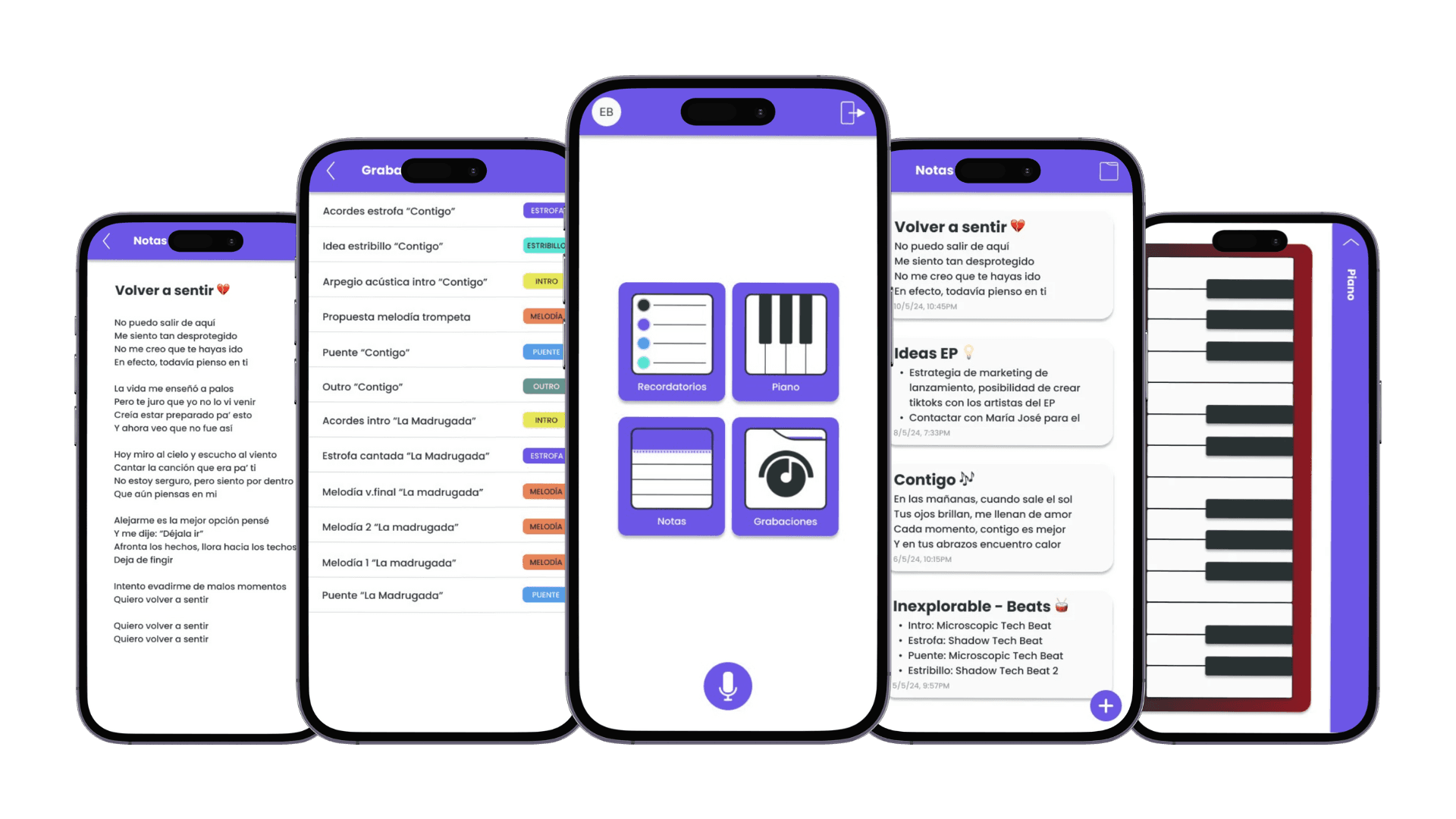
Zoundroom is an all-in-one platform designed for artists who want to optimize their creative process. With Zoundroom, you can effectively manage your ideas and projects by combining several essential tools in one easy-to-use app.
Main Features
Notes: Capture your ideas and song lyrics in a centralized place.
Recordings: Quickly record your melodies and demos.
Reminders: Set alerts and reminders so you never miss an important deadline.
Piano: Use the built-in piano to experiment and create melodies.
AI Composition Assistant: Create lyrics, titles, song structures, and find rhymes and synonyms using artificial intelligence.
Metronome: Keep perfect time while practicing or recording.
Guitar Tuner: Easily and accurately tune your instrument.
User Guide
Notes
Create a note: Go to the Notes section and tap the "+" button to add a new note.
Edit and save: Write your ideas and tap "Save" to store them.
Create a folder: In the Notes section, tap the folder icon and then the "+" button to add a new folder.
Recordings
Start a recording: Go to the main menu and tap the microphone icon to start recording.
Stop a recording: Tap the microphone icon again to stop.
Listen to a recording: Go to the "Recordings" folder to play them.
Add name and tags: Tap on a recording to edit its name and tags.
Reminders
Add a reminder: Tap the "+" button to create a new one.
Mark as completed: Swipe right and tap the green checkmark.
Delete a reminder: Swipe left and tap the red button.
Piano
Use the piano: Go to the piano section and start playing.
AI Composition Assistant
Generate lyrics: Enter a concept and the assistant will generate full lyrics.
Suggest titles: Provide lyrics and get a title suggestion.
Song structures: Choose from different structures based on musical genres.
Semantic universe: Enter a word and discover related terms.
Rhymes and synonyms: Get suggestions to enrich your lyrics.
Extend a song: Write part of a lyric and the assistant will continue it.
Metronome
Activate the metronome: Go to the metronome section to select tempo and time signature.
Guitar Tuner
Tune your instrument: Go to the tuner and follow the instructions to tune each string.
Frequently Asked Questions (FAQ)
How can I reset my password?
In the “Menu,” go to the “Reset Password” option.Can I export my recordings?
Yes, simply open the recording you want to export and tap the icon with two dots. You’ll then be able to share the recording.How do I sync Zoundroom across devices?
Make sure you’re logged into the same account on all devices. Syncing is automatic.
Troubleshooting
The app won’t open or crashes unexpectedly.
Check that you have the latest version of the app and operating system. If the issue persists, try restarting your device.I can’t record audio.
Make sure Zoundroom has microphone access enabled in your device settings.
Contact and Support
If you need additional help or have any suggestions, don’t hesitate to contact us.
Support email: soporte@zoundroom.com
Welcome to the Zoundroom Support Page!
Here you'll find all the information you need to make the most of our app and resolve any issues you may encounter. We're committed to helping you develop your creative process without interruptions.
Overview
Zoundroom is an all-in-one platform designed for artists who want to optimize their creative process. With Zoundroom, you can effectively manage your ideas and projects by combining several essential tools in one easy-to-use app.
Main Features
Notes: Capture your ideas and song lyrics in a centralized place.
Recordings: Quickly record your melodies and demos.
Reminders: Set alerts and reminders so you never miss an important deadline.
Piano: Use the built-in piano to experiment and create melodies.
AI Composition Assistant: Create lyrics, titles, song structures, and find rhymes and synonyms using artificial intelligence.
Metronome: Keep perfect time while practicing or recording.
Guitar Tuner: Easily and accurately tune your instrument.
User Guide
Notes
Create a note: Go to the Notes section and tap the "+" button to add a new note.
Edit and save: Write your ideas and tap "Save" to store them.
Create a folder: In the Notes section, tap the folder icon and then the "+" button to add a new folder.
Recordings
Start a recording: Go to the main menu and tap the microphone icon to start recording.
Stop a recording: Tap the microphone icon again to stop.
Listen to a recording: Go to the "Recordings" folder to play them.
Add name and tags: Tap on a recording to edit its name and tags.
Reminders
Add a reminder: Tap the "+" button to create a new one.
Mark as completed: Swipe right and tap the green checkmark.
Delete a reminder: Swipe left and tap the red button.
Piano
Use the piano: Go to the piano section and start playing.
AI Composition Assistant
Generate lyrics: Enter a concept and the assistant will generate full lyrics.
Suggest titles: Provide lyrics and get a title suggestion.
Song structures: Choose from different structures based on musical genres.
Semantic universe: Enter a word and discover related terms.
Rhymes and synonyms: Get suggestions to enrich your lyrics.
Extend a song: Write part of a lyric and the assistant will continue it.
Metronome
Activate the metronome: Go to the metronome section to select tempo and time signature.
Guitar Tuner
Tune your instrument: Go to the tuner and follow the instructions to tune each string.
Frequently Asked Questions (FAQ)
How can I reset my password?
In the “Menu,” go to the “Reset Password” option.Can I export my recordings?
Yes, simply open the recording you want to export and tap the icon with two dots. You’ll then be able to share the recording.How do I sync Zoundroom across devices?
Make sure you’re logged into the same account on all devices. Syncing is automatic.
Troubleshooting
The app won’t open or crashes unexpectedly.
Check that you have the latest version of the app and operating system. If the issue persists, try restarting your device.I can’t record audio.
Make sure Zoundroom has microphone access enabled in your device settings.
Contact and Support
If you need additional help or have any suggestions, don’t hesitate to contact us.
Support email: soporte@zoundroom.com
Welcome to the Zoundroom Support Page!
Here you'll find all the information you need to make the most of our app and resolve any issues you may encounter. We're committed to helping you develop your creative process without interruptions.
Overview
Zoundroom is an all-in-one platform designed for artists who want to optimize their creative process. With Zoundroom, you can effectively manage your ideas and projects by combining several essential tools in one easy-to-use app.
Main Features
Notes: Capture your ideas and song lyrics in a centralized place.
Recordings: Quickly record your melodies and demos.
Reminders: Set alerts and reminders so you never miss an important deadline.
Piano: Use the built-in piano to experiment and create melodies.
AI Composition Assistant: Create lyrics, titles, song structures, and find rhymes and synonyms using artificial intelligence.
Metronome: Keep perfect time while practicing or recording.
Guitar Tuner: Easily and accurately tune your instrument.
User Guide
Notes
Create a note: Go to the Notes section and tap the "+" button to add a new note.
Edit and save: Write your ideas and tap "Save" to store them.
Create a folder: In the Notes section, tap the folder icon and then the "+" button to add a new folder.
Recordings
Start a recording: Go to the main menu and tap the microphone icon to start recording.
Stop a recording: Tap the microphone icon again to stop.
Listen to a recording: Go to the "Recordings" folder to play them.
Add name and tags: Tap on a recording to edit its name and tags.
Reminders
Add a reminder: Tap the "+" button to create a new one.
Mark as completed: Swipe right and tap the green checkmark.
Delete a reminder: Swipe left and tap the red button.
Piano
Use the piano: Go to the piano section and start playing.
AI Composition Assistant
Generate lyrics: Enter a concept and the assistant will generate full lyrics.
Suggest titles: Provide lyrics and get a title suggestion.
Song structures: Choose from different structures based on musical genres.
Semantic universe: Enter a word and discover related terms.
Rhymes and synonyms: Get suggestions to enrich your lyrics.
Extend a song: Write part of a lyric and the assistant will continue it.
Metronome
Activate the metronome: Go to the metronome section to select tempo and time signature.
Guitar Tuner
Tune your instrument: Go to the tuner and follow the instructions to tune each string.
Frequently Asked Questions (FAQ)
How can I reset my password?
In the “Menu,” go to the “Reset Password” option.Can I export my recordings?
Yes, simply open the recording you want to export and tap the icon with two dots. You’ll then be able to share the recording.How do I sync Zoundroom across devices?
Make sure you’re logged into the same account on all devices. Syncing is automatic.
Troubleshooting
The app won’t open or crashes unexpectedly.
Check that you have the latest version of the app and operating system. If the issue persists, try restarting your device.I can’t record audio.
Make sure Zoundroom has microphone access enabled in your device settings.
Contact and Support
If you need additional help or have any suggestions, don’t hesitate to contact us.
Support email: soporte@zoundroom.com

Zoundroom, the integral platform for your musical creativity
Zoundroom, la plataforma
integral con las herramientas
necesarias para elevar
tu carrera musical
Zoundroom, la plataforma integral
con las herramientas
necesarias para
elevar tu carrera musical
